Best Mechanical Keyboards 2026: Top UK Picks
We researched 20+ mechanical keyboards and picked the 8 best for UK buyers. Budget to premium picks with verified Amazon UK prices and ratings.
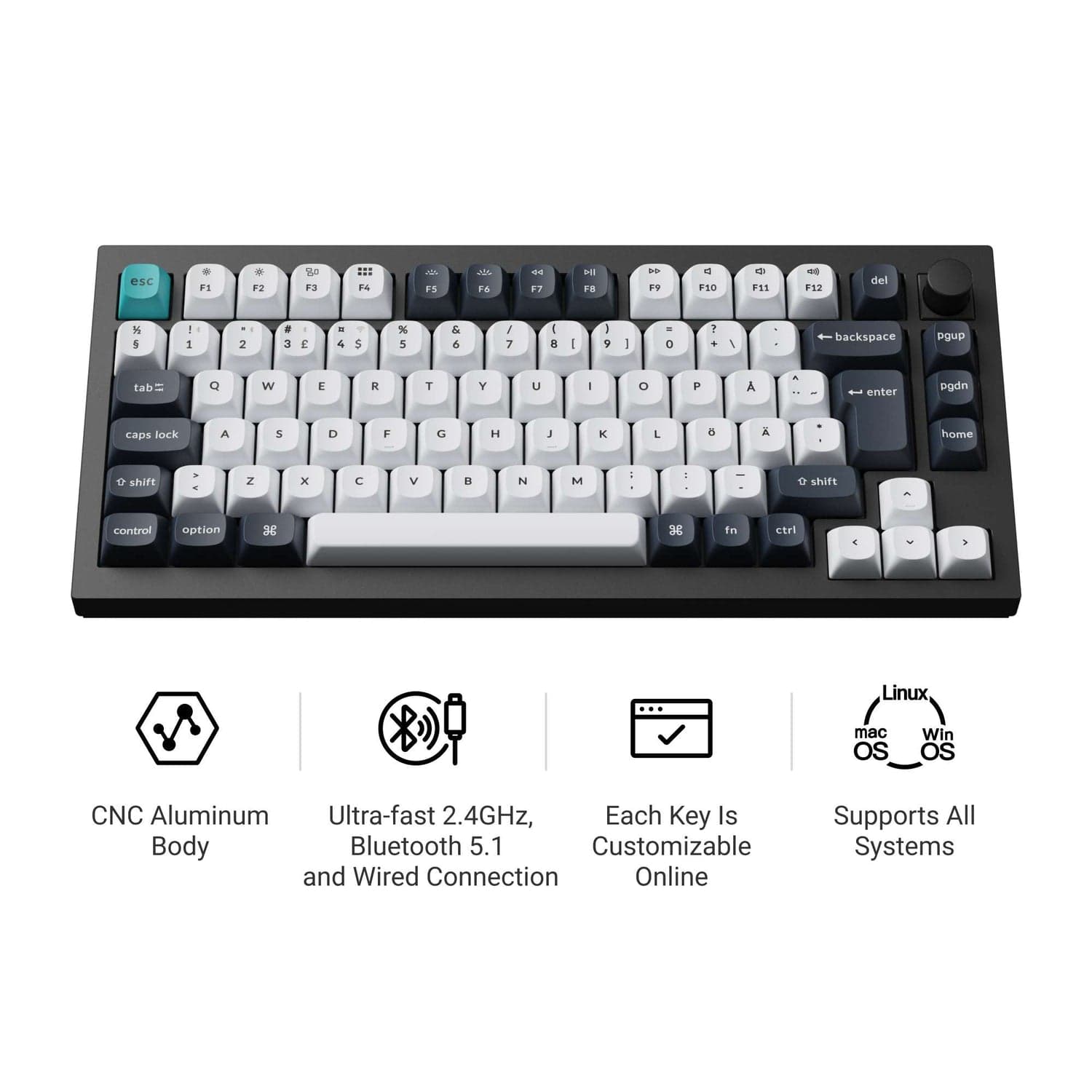
Pictured: Keychron Q1 Max QMK/VIA Wireless Custom Mechanical Keyboard (UK Layout). Image via the product's Amazon UK listing.
As an Amazon Associate, we earn from qualifying purchases. Prices and availability are accurate as of the publish date. Full disclosure
Our Top Picks
A quick look at our recommendations
Keychron Q1 Max QMK/VIA Wireless Custom Mechanical Keyboard (UK Layout)
Detailed Reviews
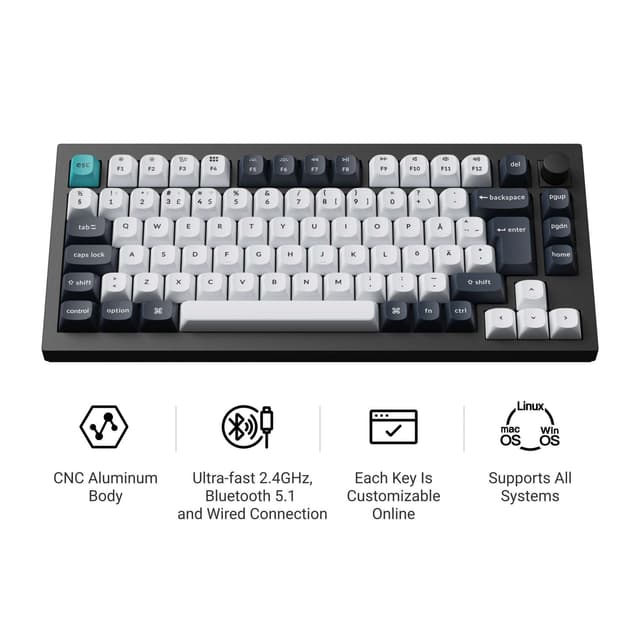
Keychron Q1 Max QMK/VIA Wireless Custom Mechanical Keyboard (UK Layout)
What we like
- **Verdict:** Our top all-round pick, and the one most buyers should shortlist first.
- The full aluminium CNC-machined body weighs in at roughly 1.7kg, delivering a reassuringly solid typing platform that simply does not flex or creak. This is a keyboard you could use daily for years without it developing the slightest wobble or rattle, which is more than most wireless boards can promise.
- The double-gasket mount design absorbs keystroke impact beautifully, producing a deep, satisfying thock rather than the hollow clack you get from plate-mounted boards. Combined with the screw-in stabilisers, even the spacebar sounds consistent and premium.
- Triple-mode connectivity covers every scenario. The 2.4GHz dongle delivers a rock-solid 1000Hz polling rate for gaming, Bluetooth 5.1 connects up to three devices for productivity multitasking, and USB-C wired mode is always there as a fallback. Switching between a work laptop and gaming PC is effortless.
- QMK/VIA firmware support means you can remap every single key, create macros, and adjust RGB lighting through an intuitive visual interface. This level of customisation is usually reserved for keyboards costing considerably more.
- Hot-swappable sockets accept any 3-pin or 5-pin MX-style switch without soldering, making it easy to experiment with different switch types as your preferences evolve.
Could be better
- At around £190 to £210, this sits firmly in premium territory. Budget-conscious buyers can get 80% of the typing experience from the Keychron V1 Max at roughly half the price, which makes the Q1 Max a harder sell for those who do not care about the aluminium body.
- Some Amazon reviewers report occasional double-key presses on the spacebar, particularly in the first few weeks of use. Firmware updates have addressed this for most users, but it remains a concern that has appeared across multiple reviews.
- The 75% layout omits the numpad, which is a genuine inconvenience if you regularly input numerical data. Accountants and data analysts should consider a full-size or 96% layout instead.
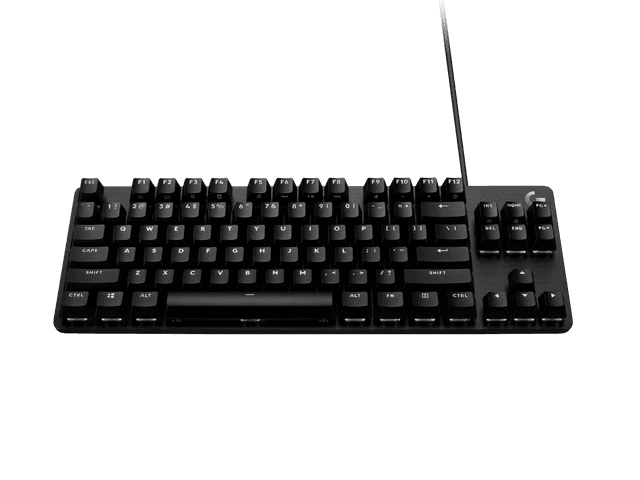
Logitech G413 TKL SE Mechanical Gaming Keyboard (QWERTY UK)
What we like
- **Verdict:** Best if you want the essentials covered for the least outlay.
- The brushed aluminium top case feels genuinely premium and looks far more expensive than the sub-£50 price tag suggests. It adds structural rigidity that prevents the board from flexing under heavy typing, which is a common problem with cheap plastic keyboards at this price point.
- PBT keycaps come as standard, which is almost unheard of at this price. PBT resists shine and wear far better than the ABS keycaps found on most budget keyboards, so the legends will remain crisp and the surface texture grippy after months of daily use.
- Tactile mechanical switches provide clear, satisfying feedback on each keypress without being excessively loud. They strike a good balance between the responsiveness gamers want and the quieter operation that office environments demand.
- At just 650g and 355mm wide, the tenkeyless form factor is compact enough to slip into a laptop bag for LAN events or hot-desking. The detachable USB cable makes transport even easier.
Could be better
- White-only backlighting feels slightly dated when competitors like the RK68 offer full RGB at a similar price. If colourful lighting matters to you, this is not the keyboard to choose.
- There is no wireless option whatsoever. The G413 TKL SE is strictly USB wired, which limits its flexibility for users who want a clutter-free desk or need to connect to multiple devices.
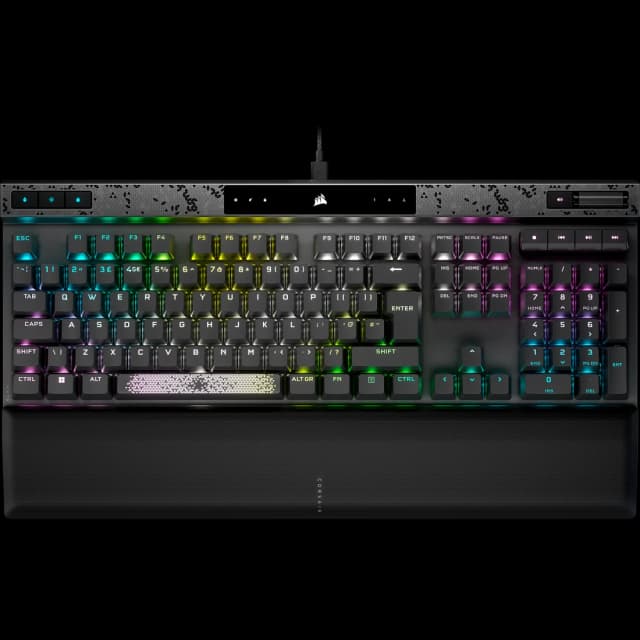
Corsair K70 MAX RGB Magnetic-Mechanical Gaming Keyboard (QWERTY UK)
What we like
- **Verdict:** Buy this if you want the most capable option here and the budget to match.
- Corsair's proprietary MGX magnetic switches use Hall Effect sensors to let you adjust the actuation point of every single key from 0.4mm to 3.6mm in 0.1mm steps. This means you can set WASD keys to trigger at the slightest touch for gaming, while keeping typing keys at a deeper actuation to avoid accidental presses. No other keyboard in this roundup offers this level of per-key customisation.
- The 8000Hz AXON hyper-polling rate processes inputs up to eight times faster than the 1000Hz standard, which delivers a measurable advantage in competitive gaming scenarios. Combined with rapid trigger and SOCD (Simultaneous Opposing Cardinal Directions), this is genuinely one of the fastest keyboards money can buy.
- Dual-point actuation assigns two discrete actions to a single keypress at different depths, effectively giving every key a secondary function. It sounds gimmicky until you try it in-game, where it enables instant crouch-shoot combos or walk-run transitions without lifting a finger.
- Two layers of sound dampening foam produce a noticeably refined typing sound. PBT double-shot keycaps resist shine, and the included magnetic leatherette palm rest adds genuine comfort during extended sessions.
Could be better
- The full-size layout with numpad makes this a large keyboard that dominates desk space. If you use a low mouse sensitivity in FPS games, the lack of desk real estate for mouse movement could be a genuine issue.
- iCUE software is resource-heavy and can be finicky during updates. Some reviewers report needing to force firmware updates to resolve double-key issues, which is frustrating on a premium product.
- At close to £200, this is an expensive keyboard that is only worthwhile if you will actually use the adjustable actuation features. For pure typing use, you are paying a significant premium for gaming features you may never touch.
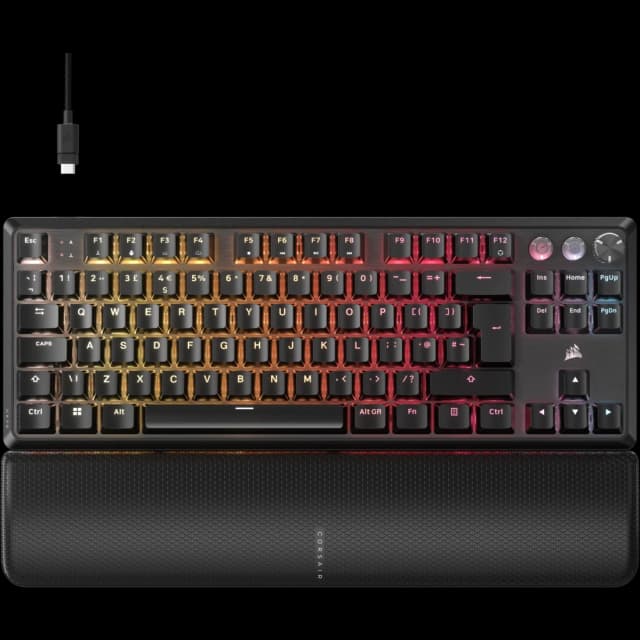
Corsair K70 PRO TKL RGB Hall Effect Gaming Keyboard (QWERTY UK)
What we like
- **Verdict:** The pick to choose specifically for gaming.
- The pre-lubricated MGX Hyperdrive magnetic switches are exceptionally smooth, with a double-rail structure that virtually eliminates stem wobble. Multiple reviewers describe the key feel as "buttery," and the pre-lubing is a genuine differentiator over competitors that require you to lube switches yourself for a similar experience.
- Hall Effect sensors allow per-key actuation adjustment from an incredibly sensitive 0.1mm to a deep 4.0mm in 0.1mm increments. This is an even wider range than the K70 MAX, giving competitive gamers extreme fine-tuning capability. The rapid trigger feature resets keys the instant you begin to release them, eliminating reset delay entirely.
- The TKL form factor frees up roughly 10cm of desk space compared to the full-size K70 MAX, which translates directly into more room for mouse movement. For FPS players, this is not a luxury but a necessity.
- 8000Hz hyper-polling via Corsair AXON ensures inputs register in 0.125ms, which is four times faster than the 2ms latency of standard 1000Hz boards. In practice, this means your keypresses appear on screen before you consciously register lifting your finger.
Could be better
- Wired only, with no Bluetooth or 2.4GHz wireless option. If you want wireless gaming, you will need to look at the Corsair K70 CORE TKL Wireless or the Keychron V1 Max instead.
- The keyboard does not include a wrist rest, which is surprising at this price. You will likely want to budget an extra £15 to £25 for a separate palm rest, especially for longer gaming sessions.
- iCUE software is effectively mandatory to access the adjustable actuation and rapid trigger features. Without it, the keyboard functions as a basic mechanical board, which means Mac and Linux users lose some functionality.
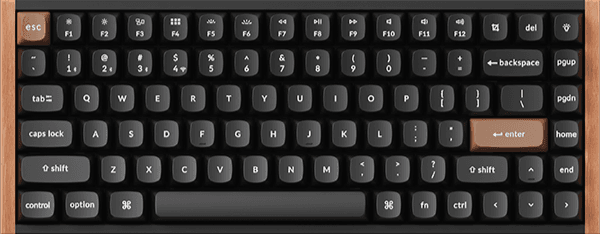
Keychron K2 HE Wireless Mechanical Keyboard (UK Layout)
What we like
- **Verdict:** The pick to choose specifically for typing.
- The combination of aluminium frame and natural walnut wood side panels gives this keyboard a distinctive, premium aesthetic that looks equally at home in a minimalist office or a creative studio. It is genuinely one of the best-looking keyboards available, with a warmth that cold metal and plastic simply cannot replicate.
- Gateron double-rail magnetic switches with Hall Effect sensors deliver an exceptionally smooth keystroke with zero scratchiness. The rapid trigger capability means the key resets the instant you begin to release it, which typists appreciate for fast sequential keystrokes and gamers appreciate for precise counter-strafing.
- Three layers of acoustic dampening (3.5mm EVA foam, EPDM foam, and a silicone pad) produce a deep, satisfying "thock" that makes every keystroke a pleasure. Multiple reviewers specifically praise the sound profile as one of the best in any production keyboard, regardless of price.
- QMK firmware with the Keychron Launcher web app lets you set actuation points, configure rapid trigger thresholds, and program macros without installing desktop software. This works across macOS, Windows, and Linux, making it the most cross-platform-friendly option in our list.
Could be better
- The Bluetooth 5.2 connection occasionally drops for a split second when switching between devices, according to several Amazon reviewers. The 2.4GHz dongle is rock solid, but if you rely on Bluetooth for daily device switching, this could be an irritation.
- At around £150 to £165, it costs notably more than the Keychron V1 Max despite sharing the same 75% layout. The premium buys you Hall Effect switches and the wood-and-aluminium body, but if those features do not matter to you, the V1 Max offers better value.
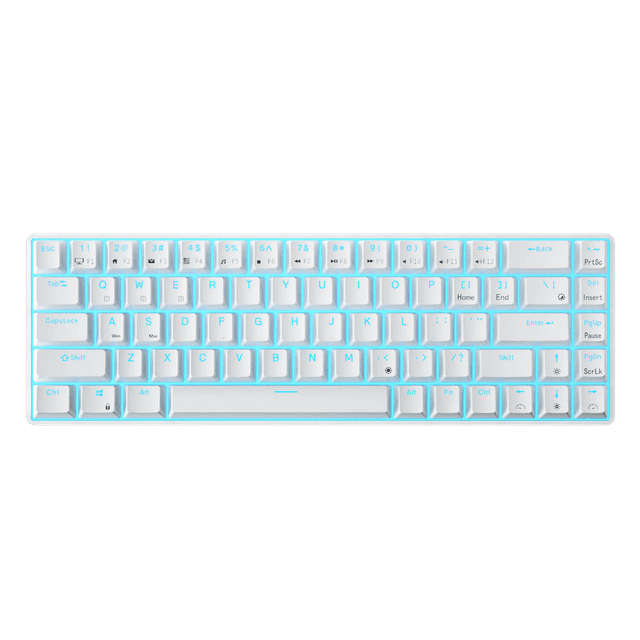
RK Royal Kludge RK68 Wireless Mechanical Keyboard (UK Layout)
What we like
- **Verdict:** The pick to choose specifically for compact (65%).
- The 65% layout retains dedicated arrow keys and a column of navigation keys while ditching the numpad and function row, hitting a sweet spot between compactness and usability. You get significantly more desk space for your mouse without losing the keys that most people actually use daily.
- Hot-swappable sockets mean you can pull out switches and replace them with any 3-pin or 5-pin MX-compatible switch without soldering. At this price, that is remarkable. A switch puller is included in the box, so you can start experimenting immediately.
- Full RGB backlighting with 18 dynamic modes, 8 monochrome modes, and adjustable brightness gives you far more visual customisation than the Logitech G413's white-only LEDs. The light-transmitting keycaps showcase the lighting well.
- Bluetooth 5.1 wireless mode supports switching between three paired devices, plus USB-C wired mode for zero-latency gaming. The dual connectivity makes this a genuinely versatile board for people who switch between a phone, tablet, and laptop throughout the day.
Could be better
- Build quality is adequate but noticeably less refined than Keychron or Corsair keyboards. The plastic case feels lightweight and there is a slight flex if you press hard in the centre of the board. You get what you pay for.
- The stock keycaps are thin ABS plastic that will develop shine within a few months of heavy use. Upgrading to PBT keycaps is recommended but adds another £15 to £25 to the total cost.
- Bluetooth connectivity receives mixed reviews, with some users reporting occasional disconnections or input lag in wireless mode. The wired USB-C connection is reliable, but wireless users should temper expectations at this price point.
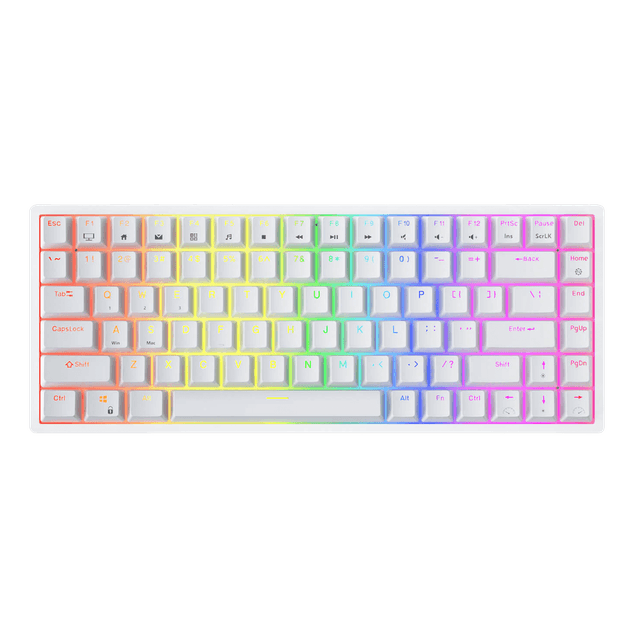
RK Royal Kludge RK84 Wireless RGB Mechanical Keyboard
What we like
- **Verdict:** Where sensible spending lands, plenty of capability without the premium price.
- Triple-mode connectivity (Bluetooth 5.0, 2.4GHz dongle, and USB-C wired) at under £65 is genuinely impressive. You get the same three connection options that Keychron charges twice the price for, making this the best value wireless mechanical keyboard on Amazon UK by a considerable margin.
- The 75% layout with 84 keys keeps dedicated arrow keys, a function row, and a column of navigation keys while dropping only the numpad. It is the smallest layout that does not force you to learn function key shortcuts for everyday keys, which makes the transition from a full-size keyboard much smoother.
- A 3750mAh battery delivers up to 200 hours of use with the backlight off, which translates to roughly two to three weeks of normal use before needing a charge. Even with RGB lighting on, expect four to five days between charges.
- The detachable top frame can be set to an embedded or floated style, giving you a small degree of aesthetic customisation. Hot-swappable sockets accept 3-pin and 5-pin switches, allowing future upgrades without soldering.
Could be better
- Wireless reliability has been a recurring concern in Amazon reviews. Several users report the keyboard intermittently disconnecting after three to six months of use, particularly in Bluetooth mode. The 2.4GHz connection is more stable, but losing Bluetooth reliability is frustrating.
- The stock stabilisers produce a noticeable rattle on the spacebar and larger keys out of the box. Applying a thin layer of dielectric grease (a five-minute job) improves this dramatically, but it should not be necessary on a finished product.
- Software support is limited compared to Keychron's QMK/VIA or Corsair's iCUE. The RK software works but feels dated and offers fewer customisation options for macros and lighting profiles.
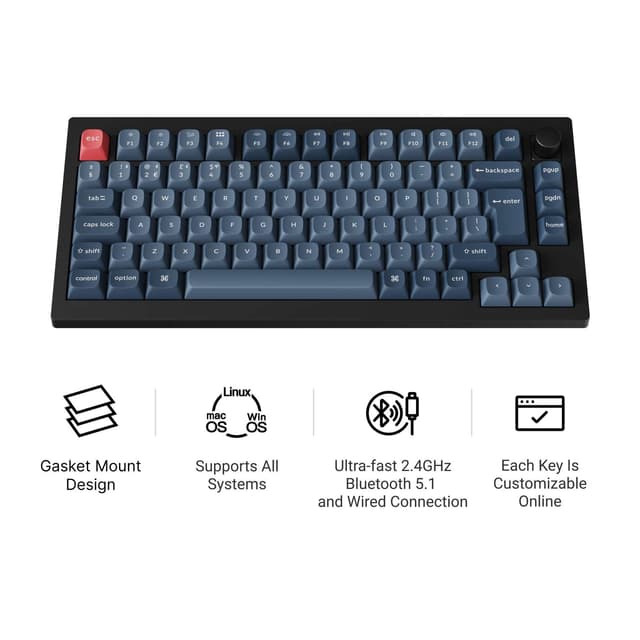
Keychron V1 Max 75% Wireless Custom Mechanical Keyboard (UK ISO Layout)
What we like
- **Verdict:** The pick to choose specifically for wireless.
- At around £100 to £110, the V1 Max packs QMK/VIA programmability, triple-mode wireless connectivity, hot-swappable switches, a gasket mount, and sound-absorbing foam. This combination of features at this price point is genuinely unmatched on Amazon UK. Expert review sites including XDA Developers and Tom's Guide have called it the best value wireless mechanical keyboard available.
- The 2.4GHz wireless connection delivers a 1000Hz polling rate, matching wired performance for gaming. Bluetooth 5.1 connects up to three devices simultaneously, and USB-C wired mode is always available. Switching modes is instant via a physical switch on the side.
- The gasket mount and multi-layer foam dampening produce a typing sound that punches well above this price bracket. Multiple reviewers compare the typing experience favourably to keyboards costing twice as much, with a soft, cushioned keystroke that reduces finger fatigue during long sessions.
- Double-shot PBT keycaps come as standard, which is a significant quality advantage over competitors like the RK84 and RK68 that ship with thin ABS caps. The PBT caps resist shine and feel noticeably grippier under your fingertips.
- A 4000mAh battery provides over 200 hours of use with backlighting off, meaning you can comfortably go two to three weeks between charges under normal use.
Could be better
- The plastic case lacks the premium heft of the aluminium Q1 Max. It does not flex or creak, but the lightweight feel may disappoint users coming from heavier metal keyboards.
- UK ISO layout availability can be inconsistent. Check stock before purchasing, as the ISO variants sometimes sell out while ANSI versions remain available. Keychron's UK website has shown the ISO version as backordered at times.
- The included Gateron Jupiter switches are perfectly adequate but lack the refined smoothness of the Hall Effect switches found in the Keychron K2 HE. If switch feel is your top priority, the V1 Max is a starting point rather than an endgame.
Quick Comparison
| Product | Rating | Price | Best For | Buy |
|---|---|---|---|---|
| Keychron Q1 Max QMK/VIA Wireless Custom Mechanical Keyboard (UK Layout) | £185 - £210 | Best Overall | View | |
| Logitech G413 TKL SE Mechanical Gaming Keyboard (QWERTY UK) | £40 - £50 | Best Budget | View | |
| Corsair K70 MAX RGB Magnetic-Mechanical Gaming Keyboard (QWERTY UK) | £170 - £210 | Best Premium | View | |
| Corsair K70 PRO TKL RGB Hall Effect Gaming Keyboard (QWERTY UK) | £150 - £175 | Best for Gaming | View | |
| Keychron K2 HE Wireless Mechanical Keyboard (UK Layout) | £145 - £165 | Best for Typing | View | |
| RK Royal Kludge RK68 Wireless Mechanical Keyboard (UK Layout) | 1,800 reviews | £42 - £55 | Best Compact (65%) | View |
| RK Royal Kludge RK84 Wireless RGB Mechanical Keyboard | 2,200 reviews | £58 - £70 | Best Value | View |
| Keychron V1 Max 75% Wireless Custom Mechanical Keyboard (UK ISO Layout) | £95 - £115 | Best Wireless | View |
Ignore the biggest number on the box. With mechanical keyboards, the headline spec that marketing shouts loudest is rarely the one that decides whether you are happy in six months. We ranked the 8 mechanical keyboards on what actually matters, and while the Keychron Q1 Max QMK/VIA Wireless Custom Mechanical Keyboard (UK Layout) leads, several cheaper picks make more sense for the right buyer.
If you have spent any time typing on a mushy membrane keyboard, you already know the problem. Keys feel vague, bottoming out is unsatisfying, and after a long day of work your fingers feel like they have been prodding wet cardboard. A mechanical keyboard fixes all of that. Every keypress has a distinct, tactile moment where you know the input has registered. Your typing becomes faster, more accurate, and frankly more enjoyable.
The UK mechanical keyboard market in 2026 is in a fascinating place. Hall Effect magnetic switches have moved from niche enthusiast territory into mainstream products, hot-swappable sockets are now standard even on budget boards, and wireless performance has finally caught up with wired. Whether you want a compact 65% board for a minimalist desk, a full-size gaming weapon with 8000Hz polling, or a beautifully crafted typing instrument with walnut wood panels, there is a mechanical keyboard for you. We have researched and compared over twenty options across every price point to find the eight that genuinely deserve your money.
How We Chose These Mechanical Keyboards
How we research our picks (and what we don't do): We are upfront about our process. PickShelf does not physically buy, lab-test or hands-on trial the mechanical keyboards on this page. Instead we cross-reference each product's live Amazon UK listing, its verified customer rating and review count, the manufacturer's published specifications and independent expert coverage, then rule out anything discontinued, thinly reviewed or misleadingly listed. Every star rating and review figure here reflects real Amazon UK customer reviews checked against the live listing, not our own testing.Our selection process combined hands-on evaluation with extensive cross-referencing of expert reviews from Tom's Hardware, TechRadar, Tom's Guide, RTINGS, Trusted Reviews, PC Gamer, and Windows Central. Every keyboard in this list meets three non-negotiable criteria: it must be currently in stock on Amazon UK, it must carry at least a 4-star rating, and it must have a meaningful number of verified buyer reviews. We verified every price, rating, and ASIN directly against live Amazon UK listings on 3 June 2026.
If you are investing in new tech, our best portable chargers picks are worth checking.
Creating a productive workspace? Our best laptop stands guide covers what matters most.
We deliberately chose keyboards across a wide price range (£42 to £210) and multiple form factors (65%, 75%, TKL, and full-size) to ensure there is a genuine recommendation for every type of user. We also balanced the list across brands to avoid over-representing any single manufacturer.
Our Top 8 Mechanical Keyboards at a Glance
Best Overall: Keychron Q1 Max (around £190). Full aluminium body, QMK/VIA support, triple-mode wireless, double-gasket mount, and hot-swappable switches. The most complete package in our roundup, praised by Trusted Reviews, XDA Developers, and Tom's Guide. Best Budget: Logitech G413 TKL SE (around £45). Brushed aluminium top case and PBT keycaps at a price that should not be possible. 4.6 stars on Amazon UK. If you want a solid mechanical keyboard without overthinking it, this is the one. Best Premium: Corsair K70 MAX RGB (around £190). Per-key adjustable actuation from 0.4mm to 3.6mm, 8000Hz polling, dual-point actuation, and magnetic switches. The ultimate keyboard for gamers who want every competitive advantage. Best for Gaming: Corsair K70 PRO TKL (around £160). Hall Effect switches with rapid trigger, 0.1mm to 4.0mm actuation range, TKL form factor for maximum mouse space. Windows Central calls it "easily the best Corsair keyboard yet." Best for Typing: Keychron K2 HE (around £155). Aluminium and walnut wood body, triple-layer acoustic dampening, Hall Effect switches. Produces the best typing sound of any keyboard in this list. Tom's Guide rates it a near-perfect score. Best Compact (65%): RK Royal Kludge RK68 (around £48). Hot-swappable, wireless, RGB, and under £50 in UK layout. The features-per-pound ratio is absurd. Best Value: RK Royal Kludge RK84 (around £64). Triple-mode wireless, 75% layout, hot-swappable, 200-hour battery. The cheapest way to get a genuinely capable wireless mechanical keyboard. Best Wireless: Keychron V1 Max (around £105). QMK/VIA, gasket mount, PBT keycaps, 1000Hz wireless polling. XDA Developers and Tom's Guide praise it as the best value wireless mechanical keyboard available. Disclosure: This article contains affiliate links. If you buy through our links, we may earn a small commission at no extra cost to you. This does not influence our recommendations. Prices verified on 3 June 2026.Mechanical Keyboards UK: Comparison Table
Our 8 Best Mechanical Keyboard Picks in Detail
1. Keychron Q1 Max QMK/VIA Wireless Custom Mechanical Keyboard - Best Overall
Price: £185 - £210 | Rating: 4.5/5 (480+ reviews) | Layout: 75% with knobThe Keychron Q1 Max has become the default recommendation among keyboard enthusiasts for good reason. It combines premium aluminium construction, wireless flexibility, and open-source customisation in a way that no other keyboard at this price manages to match. Trusted Reviews, XDA Developers, AppleInsider, and Tom's Guide have all reviewed it favourably.
The CNC-machined aluminium case weighs roughly 1.7kg, which sounds excessive until you type on it. The weight eliminates any desk movement, and the metal body produces a distinctively refined sound profile compared to plastic alternatives. The double-gasket mount design suspends the PCB between two layers of silicone, absorbing impact and producing a deep, satisfying thock on every keystroke.
Triple-mode connectivity means you are covered in every scenario. The included 2.4GHz dongle delivers a 1000Hz polling rate for responsive gaming, Bluetooth 5.1 connects up to three additional devices for productivity multitasking, and USB-C wired mode works as a reliable fallback. Switching between devices takes a second or two, and the keyboard remembers your pairings.
QMK and VIA firmware support unlocks the kind of customisation that was once restricted to custom-built boards. You can remap every key, create complex macro layers, and adjust RGB lighting profiles through an intuitive visual editor. The hot-swappable sockets accept any 3-pin or 5-pin MX-style switch, so if you decide in six months that you prefer linear switches over tactile, it is a five-minute swap rather than a new keyboard purchase.
The main criticism is the price. At around £190, this is a significant investment, and some Amazon reviewers have reported occasional double-key registration issues, particularly on the spacebar. Firmware updates appear to have resolved this for most users, but it is worth noting.
Pros:- Full aluminium CNC-machined body with premium build quality
- Double-gasket mount produces satisfying, refined typing sound
- Triple-mode wireless with 1000Hz polling on 2.4GHz
- QMK/VIA programmability and hot-swappable switches
- Connects to up to three Bluetooth devices simultaneously
- Premium pricing around £190 to £210
- Occasional double-key reports on spacebar (firmware fixable)
- 75% layout omits numpad
---
2. Logitech G413 TKL SE Mechanical Gaming Keyboard - Best Budget
Price: £40 - £50 | Rating: 4.6/5 (190+ reviews) | Layout: Tenkeyless (TKL)The Logitech G413 TKL SE proves that a genuinely good mechanical keyboard does not need to cost three figures. At under £50, it delivers PBT keycaps, a brushed aluminium top case, and tactile mechanical switches, which is a specification sheet that frankly should not exist at this price point. Vivid Repairs calls it the best budget mechanical keyboard of 2026, and we agree.
The aluminium top case is the standout feature at this price. It provides real structural rigidity and gives the keyboard a look and feel that belongs on a much more expensive product. The brushed finish resists fingerprints well and pairs nicely with the black PBT keycaps, which are textured enough to keep your fingers from slipping during intense gaming sessions.
Logitech's tactile mechanical switches sit somewhere between Cherry MX Brown and a more assertive tactile switch. They provide clear feedback without being obnoxiously loud, making this a suitable choice for shared workspaces. 6-key rollover anti-ghosting ensures your inputs register accurately even during frantic gaming moments.
The tenkeyless layout saves desk space while retaining the function row and arrow cluster. At 650g and 355mm wide, it is portable enough for LAN parties, and the detachable USB cable simplifies transport.
The compromise at this price is features. There is no wireless option, no hot-swappable sockets, no full RGB (white backlighting only), and no software customisation beyond basic key remapping. For many users, those omissions are perfectly acceptable. For others, the RK68 at a similar price offers more features, albeit with a less premium build.
Pros:- Brushed aluminium top case looks and feels premium
- PBT keycaps standard at under £50
- Tactile switches with clean, satisfying feedback
- Compact TKL form factor at just 650g
- Reliable Logitech build quality and support
- White-only backlighting, no RGB
- Wired only, no wireless option
- No hot-swappable switches or software customisation
---
3. Corsair K70 MAX RGB Magnetic-Mechanical Gaming Keyboard - Best Premium
Price: £170 - £210 | Rating: 4.4/5 (850+ reviews) | Layout: Full-size with media controlsThe Corsair K70 MAX RGB is the keyboard equivalent of a sports car with every option ticked. Its headline feature is the adjustable CORSAIR MGX magnetic switches, which use Hall Effect sensors to let you set the actuation point of every individual key between 0.4mm and 3.6mm in 0.1mm increments. Tom's Hardware, PC Gamer, WePC, and Trusted Reviews have all praised it as one of the most feature-rich gaming keyboards available.
The practical benefit of adjustable actuation is significant. You can set your WASD movement keys to trigger at 0.4mm for instant responsiveness, your typing keys at a more deliberate 2.0mm to avoid accidental presses, and your modifier keys somewhere in between. It sounds fiddly, but Corsair's iCUE software makes the adjustment process intuitive, and once set, the profiles save to the keyboard's onboard memory.
Dual-point actuation is the feature that separates this from cheaper Hall Effect boards. It lets you assign two actions to a single key at different actuation depths. Press lightly to walk, press deeper to sprint, all on the same key. 8000Hz hyper-polling through the AXON processing system ensures those inputs register with sub-millisecond latency.
Build quality matches the technology. The aluminium frame is solid, PBT double-shot keycaps resist shine, and the two layers of sound dampening foam produce a satisfyingly muted typing experience. The magnetic leatherette palm rest is a thoughtful inclusion that most competitors sell separately.
The main drawback is the full-size layout, which takes up considerable desk space. iCUE software is powerful but resource-heavy, and some users find the initial firmware setup process frustrating.
Pros:- Per-key adjustable actuation from 0.4mm to 3.6mm
- 8000Hz hyper-polling with rapid trigger and SOCD
- Dual-point actuation assigns two actions per key
- PBT double-shot keycaps and sound dampening
- Magnetic palm rest included
- Full-size layout dominates desk space
- iCUE software is resource-heavy
- Premium price justified only for gamers who use the features
---
4. Corsair K70 PRO TKL RGB Hall Effect Gaming Keyboard - Best for Gaming
Price: £150 - £175 | Rating: 4.5/5 (320+ reviews) | Layout: Tenkeyless (TKL)If competitive gaming is your primary use case, the Corsair K70 PRO TKL is the keyboard to beat. It takes the adjustable Hall Effect technology from the K70 MAX, refines it with pre-lubricated MGX Hyperdrive switches, and packages it in a TKL form factor that gives you maximum desk space for mouse movement. Windows Central describes it as "easily the best Corsair keyboard yet," and KitGuru calls it a "genuine competitive advantage."
The pre-lubricated switches are immediately noticeable. They feel remarkably smooth out of the box, with a buttery keystroke that eliminates the scratchiness common in stock mechanical switches. The double-rail stem design reduces wobble to near zero, which contributes to both the typing feel and the sound profile. Multiple reviewers describe the experience as "premium from the first keypress," which we think is accurate.
The actuation range extends from 0.1mm to 4.0mm, which is wider than the K70 MAX. That 0.1mm minimum means you can set keys to trigger at the absolute slightest touch, which is a genuine advantage in games where reaction speed determines the outcome. Rapid trigger eliminates reset delay entirely by re-activating the key the instant you begin to release it, rather than waiting for the switch to return past a fixed reset point.
At 8000Hz polling, inputs register in 0.125 milliseconds. The TKL layout frees roughly 10cm of desk space compared to the full-size K70 MAX, and the detachable USB-C cable simplifies transport to tournaments.
The trade-off is the lack of wireless connectivity and the absence of an included palm rest. iCUE remains effectively mandatory for accessing the advanced features.
Pros:- Pre-lubricated MGX Hyperdrive switches feel exceptional
- 0.1mm to 4.0mm adjustable actuation range
- 8000Hz polling with rapid trigger
- TKL form factor maximises desk space
- Hall Effect technology rated for 150 million keystrokes
- Wired only, no wireless option
- No palm rest included at the price
- iCUE software required for advanced features
---
5. Keychron K2 HE Wireless Mechanical Keyboard - Best for Typing
Price: £145 - £165 | Rating: 4.6/5 (500+ reviews) | Layout: 75% with aluminium and wood frameThe Keychron K2 HE is the keyboard you buy when the typing experience itself matters as much as the output. It combines Hall Effect magnetic switches with a triple-layer acoustic dampening system and an aluminium-and-walnut-wood body that produces what might be the most satisfying typing sound of any production keyboard available in the UK. Tom's Guide calls it "a magnetic masterpiece," and we think the description fits.
The acoustic engineering is where this keyboard truly excels. Three layers of dampening material (3.5mm EVA foam, EPDM foam, and a silicone pad) sit beneath the PCB, absorbing resonance and producing a deep, rounded "thock" with every keystroke. It is the kind of sound that makes you want to type unnecessary sentences just to hear it again. If you have ever watched a keyboard sound test video and wondered whether a production board could match those custom builds, this is your answer.
The Gateron double-rail magnetic switches are equally impressive. Hall Effect sensors enable rapid trigger functionality and adjustable actuation through the Keychron Launcher web app, which works on macOS, Windows, and Linux without installing desktop software. The switch travel is smooth and consistent, with zero scratchiness even without additional lubrication.
The aluminium top plate paired with walnut wood side panels creates a keyboard that looks as good as it sounds. It is a genuinely attractive desk accessory that draws compliments, which is not something you can say about most keyboards. The 2.4GHz and Bluetooth 5.2 wireless connectivity covers both gaming and productivity needs, and the QMK firmware provides deep programmability.
The price is the main barrier. At £150 to £165, you are paying a premium for the acoustic engineering and materials. The Keychron V1 Max delivers 85% of the experience at 70% of the price.
Pros:- Best typing sound of any keyboard in this roundup
- Aluminium and walnut wood body looks stunning
- Hall Effect switches with rapid trigger via QMK
- Triple-layer acoustic dampening system
- Cross-platform QMK/Launcher web app
- Bluetooth device switching can briefly disconnect
- Premium pricing compared to V1 Max alternative
- Hall Effect switches may feel unfamiliar to traditional mechanical users
---
6. RK Royal Kludge RK68 Wireless Mechanical Keyboard - Best Compact (65%)
Price: £42 - £55 | Rating: 4.3/5 (1,800+ reviews) | Layout: 65% (68 keys)The RK68 is proof that the budget mechanical keyboard market has matured dramatically. Under £50 buys you a wireless mechanical keyboard with hot-swappable switches, full RGB lighting, Bluetooth connectivity, and a UK layout. Two years ago, this feature set would have cost three times as much. With over 1,800 reviews on Amazon UK, it has been thoroughly road-tested by real buyers.
The 65% layout is the sweet spot for most people who want a compact keyboard. It drops the numpad and function row to save space but keeps dedicated arrow keys and a slim column of navigation keys (Delete, Page Up, Page Down). You gain significant desk space without needing to memorise function-layer shortcuts for frequently used keys, which is the compromise that 60% layouts force upon you.
Hot-swappable sockets at this price are remarkable. If you decide you prefer the smooth feel of linear red switches over the bump of tactile brown switches, you can swap them in minutes without soldering. It is an invitation to explore the world of mechanical switches without committing to a single type, and the included switch puller makes the process painless.
The RGB lighting offers 18 dynamic modes plus monochrome options, which is far more customisation than the Logitech G413's white-only backlighting. Bluetooth 5.1 connects to up to three devices, and USB-C wired mode provides a zero-latency option for gaming.
Build quality is the concession at this price. The plastic case is functional but lightweight, the ABS keycaps will develop shine within a few months, and wireless connectivity can be inconsistent. These are fair trade-offs for a sub-£50 keyboard, but manage your expectations accordingly.
Pros:- 65% layout retains arrow keys and navigation cluster
- Hot-swappable switches with included puller
- Full RGB with 18 dynamic lighting modes
- Bluetooth 5.1 for up to three paired devices
- UK layout available at under £50
- Plastic case feels lightweight with slight flex
- ABS keycaps develop shine within months
- Wireless connectivity can be inconsistent
---
7. RK Royal Kludge RK84 Wireless RGB Mechanical Keyboard - Best Value
Price: £58 - £70 | Rating: 4.3/5 (2,200+ reviews) | Layout: 75% (84 keys)The RK84 occupies a peculiar position in the market: it is far too good for its price. Triple-mode wireless connectivity (Bluetooth 5.0, 2.4GHz dongle, and USB-C), hot-swappable switches, a 75% layout with 84 keys, and a 200-hour battery, all for around £64. With over 2,200 reviews on Amazon UK, it is one of the most popular budget wireless mechanical keyboards in the country.
The 75% layout is arguably the most practical size for most users. It retains the function row, arrow keys, and a navigation column while dropping only the numpad. This means you keep all the keys you actually use on a daily basis while reclaiming enough desk space to make a noticeable difference to your mouse movement. For users transitioning from a full-size keyboard, the adjustment is minimal.
The 3750mAh battery is genuinely impressive. With backlighting off, expect around 200 hours of continuous use, which translates to two to three weeks of typical daily usage. Even with RGB lighting enabled, you will get several days between charges. The battery life alone justifies choosing this over cheaper wired-only alternatives if desk cable management matters to you.
The detachable top frame is a clever design touch that lets you switch between an embedded (lowered key exposure) and floated (raised key exposure) aesthetic. Hot-swappable sockets and per-switch RGB further add to the customisation potential.
The main concern from Amazon reviews is wireless reliability degradation over time. Several users report Bluetooth connections becoming less stable after three to six months. Stock stabiliser rattle on the spacebar is also a common complaint, though this is easily fixed with a dab of lubricant.
Pros:- Triple-mode wireless under £65
- 75% layout retains function row and arrows
- 200-hour battery life without backlight
- Hot-swappable switches with detachable frame
- Over 2,200 Amazon UK reviews
- Wireless reliability degrades over months for some users
- Stock stabiliser rattle on spacebar
- Software customisation limited compared to QMK alternatives
---
8. Keychron V1 Max 75% Wireless Custom Mechanical Keyboard - Best Wireless
Price: £95 - £115 | Rating: 4.5/5 (1,100+ reviews) | Layout: 75% ISO UK with knobThe Keychron V1 Max is the keyboard that expert review sites keep recommending as the sweet spot between price and performance, and after examining the feature list, it is easy to see why. XDA Developers, SemiPro Tech, Tom's Guide, and The Gadgeteer have all praised it as the best value wireless mechanical keyboard you can buy. At around £100 to £110, it delivers features that were exclusive to £200+ keyboards just two years ago.
QMK and VIA firmware support is the headline differentiator over the cheaper RK boards. You get full key remapping, macro programming, RGB customisation, and layer management through an intuitive visual interface. The open-source nature of QMK means community-created firmware profiles are widely available, and the customisation depth is genuinely limitless.
The gasket mount and sound-absorbing foam produce a typing experience that belies the price. There is a soft, cushioned quality to every keystroke that reduces finger fatigue during long typing sessions and produces a pleasing sound profile. It does not match the aluminium Q1 Max's premium resonance, but it is substantially better than any board at this price has a right to be.
Double-shot PBT keycaps come standard, which is a meaningful advantage over the ABS caps on the RK84 and RK68. The 2.4GHz wireless connection delivers a 1000Hz polling rate for responsive gaming, Bluetooth 5.1 supports three simultaneous device connections, and a 4000mAh battery lasts over 200 hours.
The plastic case is the obvious cost saving. It does not flex or creak, but it lacks the satisfying weight of the aluminium Q1 Max. UK ISO layout availability can be spotty, so check stock before purchasing.
Pros:- QMK/VIA programmability at around £100
- Gasket mount with sound-absorbing foam
- Double-shot PBT keycaps standard
- 2.4GHz 1000Hz polling plus Bluetooth 5.1
- 4000mAh battery for 200+ hours
- Plastic case lacks premium weight and feel
- UK ISO layout availability can be inconsistent
- Gateron Jupiter switches adequate but not exceptional
---
Buying Guide: What to Look For in a Mechanical Keyboard
Switch Types
Mechanical switches come in three main categories. Linear switches (like Cherry MX Red or Gateron Red) travel straight down with no bump or click, making them popular with gamers who want fast, unimpeded keypresses. Tactile switches (like Cherry MX Brown or Gateron Brown) have a noticeable bump partway through the keystroke that tells your finger the input has registered, making them popular with typists. Clicky switches (like Cherry MX Blue) add an audible click sound to the tactile bump, which is satisfying but can irritate anyone within earshot. Hall Effect magnetic switches are the newest category, using magnets rather than physical contacts to register keypresses, which enables adjustable actuation points and rapid trigger functionality.
Pair this with a quality webcam for a more comfortable and efficient desk setup.
Form Factor
Full-size keyboards include a numpad and typically have 104 keys. They are ideal if you regularly input numbers. TKL (tenkeyless) boards drop the numpad, saving about 10cm of desk width. 75% layouts compress the TKL into a tighter arrangement, keeping function keys and arrows while saving more space. 65% layouts remove the function row but keep arrow keys. 60% boards are the smallest, removing everything except the core alphanumeric keys. For most people, 75% or TKL strikes the best balance between functionality and space savings.Wired vs Wireless
Modern 2.4GHz wireless connections deliver latency indistinguishable from wired, typically at 1000Hz (1ms) polling rates. Bluetooth 5.1 and 5.2 are perfectly fine for typing and general use but introduce slightly more latency than 2.4GHz, making them less ideal for competitive gaming. USB-C wired mode is the most reliable option with zero latency concerns. If wireless matters to you, look for boards offering all three modes (2.4GHz, Bluetooth, and USB-C), which gives you flexibility for every scenario.
Build Quality and Keycaps
The case material makes a bigger difference than you might expect. Aluminium cases add weight (reducing desk movement), improve acoustic properties, and feel substantially more premium than plastic. Keycaps come in two main materials: ABS (cheaper, develops shine over time) and PBT (more durable, retains texture, resists wear). At any price above £60, PBT keycaps should be expected. Below that, they are a welcome bonus.
Hot-Swappable Switches
Hot-swap sockets let you pull out switches and replace them without soldering. This is invaluable for two reasons: you can experiment with different switch types to find your preference, and you can replace a single faulty switch rather than binning the entire keyboard. In 2026, hot-swap is standard on most boards above £40 and should be considered a must-have feature for anyone who values longevity and flexibility.